
How to Track ChatGPT and AI Traffic in Google Analytics
Artificial intelligence is changing how people discover businesses online. Tools such as ChatGPT, Microsoft Copilot, Perplexity and Google AI Overviews are increasingly being used to research products, services and local companies. As a result, many business owners are now asking an important question:
Can I see if people are visiting my website through ChatGPT and other AI tools?
The short answer is yes, in some cases. Modern analytics platforms such as Google Analytics 4 (GA4) can sometimes show referral traffic from AI platforms. However, AI traffic tracking is still evolving and does not always work in the same way as traditional search traffic.
As more businesses focus on getting found in ChatGPT and AI-powered search results, understanding how to measure this traffic is becoming increasingly important. If you have not yet read our guide on how to get your business found on ChatGPT and AI platforms, it is a useful starting point before learning how to track AI visitors in Google Analytics.
In this article, we explain how AI referral traffic works, how to track ChatGPT visitors in Google Analytics and what business owners should understand about AI visibility.
Why Tracking AI Traffic Matters
Many businesses are now appearing within AI-generated answers before they rank strongly on Google.
When someone clicks a website link inside ChatGPT, Google Analytics 4 can often record the visit as:
chatgpt.com / referral
This allows businesses to:
- monitor AI visibility
- track AI referral traffic
- identify high-performing landing pages
- measure engagement from AI users
- improve GEO and AI search optimisation strategies
Tracking AI traffic also helps businesses understand which content performs best inside AI platforms.
Detailed service pages, FAQs, blog articles and location pages often attract strong AI visibility because they provide clear and structured information.
As AI powered search continues to grow, businesses that monitor AI traffic early may gain a significant long-term advantage.
Example: Tracking AI Traffic for ABC Plumbing Leeds
Imagine a company called ABC Plumbing Leeds has recently improved its website content and added detailed service pages.
The company creates:
- a boiler repair page
- an emergency plumber page
- location pages for Leeds and surrounding areas
- FAQs answering customer questions
A potential customer then asks ChatGPT:
“Who offers emergency boiler repairs in Leeds?”
ChatGPT may recommend ABC Plumbing Leeds because the website clearly explains:
- the services offered
- the areas covered
- emergency response availability
- contact details and trust signals
If the user clicks through to the website, Google Analytics may record the visit as referral traffic from ChatGPT or another AI platform.
This gives businesses a new way to measure AI visibility and understand how users discover their website through AI search.
“GA4 helps you track how people discover your site, what they do once they arrive, and which pages actually keep their attention.”
How To Find ChatGPT Traffic In GA4
One of the easiest ways to check for AI traffic is through the Traffic Acquisition reports inside Google Analytics 4.
Step 1: Open Google Analytics 4
Go to your GA4 property and select:
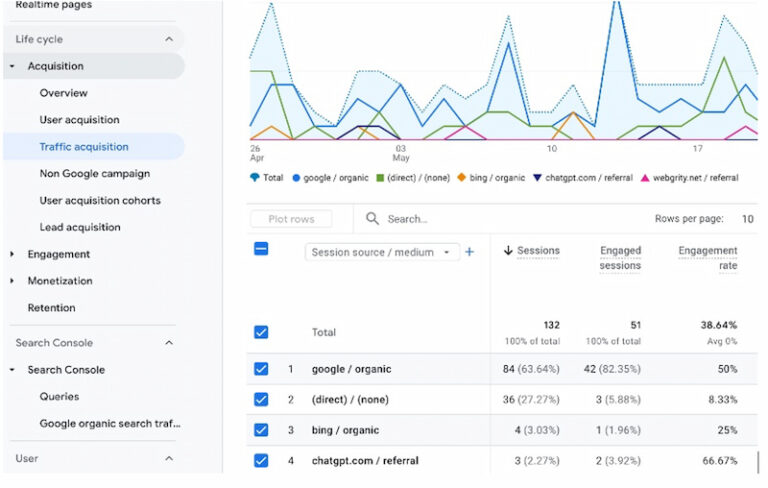
Reports → Acquisition → Traffic Acquisition (see image below)
This report shows where your website visitors came from.
See image below for a website showing referral traffic (3) in the last seven days. As SEO and GEO efforts improve, AI referral traffic may continue increasing over time.
Step 2: Change The Primary Dimension
At the top of the table, change the primary dimension to:
Session source / medium
This allows GA4 to display referral traffic sources such as:
- google / organic
- bing / organic
- direct / none
- chatgpt.com / referral
If your website has received ChatGPT traffic, you may now see:
chatgpt.com / referral within the table.
Step 3: Adjust Your Date Range
If no ChatGPT traffic appears immediately:
- expand the date range
- try the last 30, 60 or 90 days
- check again later if your website is relatively new
AI referral traffic is still growing in 2026. Smaller websites may not yet receive regular ChatGPT referrals.
Step 4: Search For AI Referral Sources
Use the search box inside GA4 to look for terms such as:
- chatgpt
- openai
- perplexity
- copilot
- gemini
- edge
Some AI traffic may appear through browser integrations or AI powered search experiences connected with Microsoft Edge or Bing.
How To View ChatGPT Landing Pages In GA4
Once you can see ChatGPT referral traffic, the next step is finding which pages users landed on.
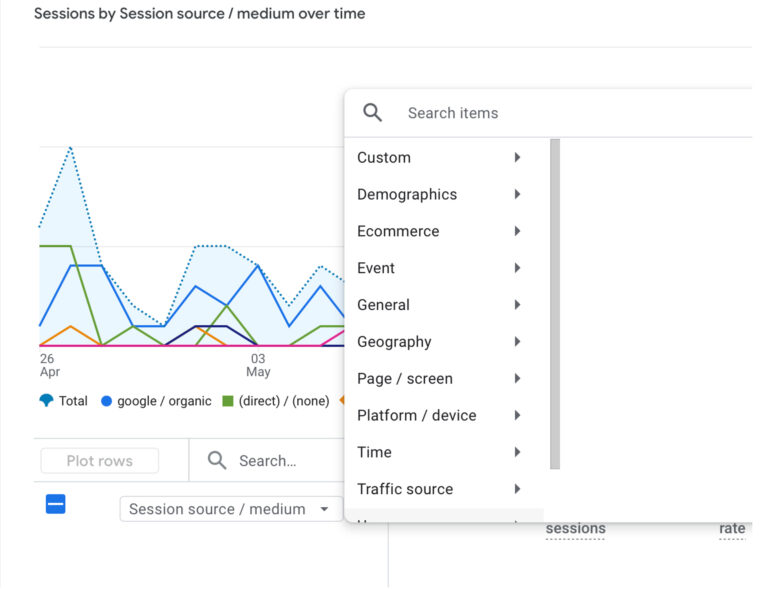
Step 1: Add A Secondary Dimension
Click the blue “+” icon beside:
Session source / medium
Then select:
Page / screen → Landing page + query string (see screenshot below)
GA4 will now display the specific landing pages that received ChatGPT traffic.
You may see pages such as:
- /website-design-leeds/
- /electrician-in-brighton/
- /organic-butcher-wales/
This helps businesses understand:
- which pages AI platforms prefer
- which content performs best
- what topics attract AI users
- where AI visibility is strongest
Businesses often discover that detailed service pages, FAQs and blog posts attract some of the strongest AI related traffic.
How To Save Your ChatGPT Referral Report
If you close the report now, you may need to repeat the setup process later.
Instead, you can save a dedicated ChatGPT traffic report inside GA4.
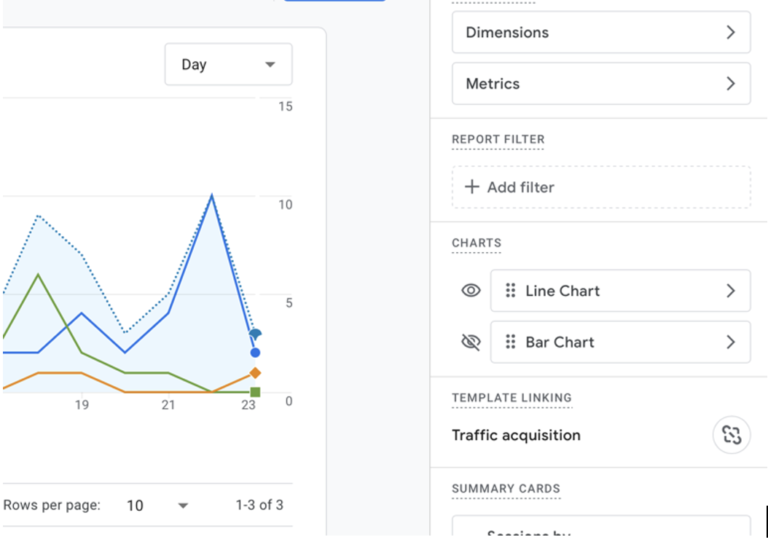
Step 1: Click The Pencil Icon
Near the top-right of the report, click the pencil/edit icon.
This opens the report customisation panel. (see below)
Step 2: Add A Filter
In the right sidebar:
- Click Add filter
- Select:
Session source / medium - Set the condition to:
Exactly matches - Enter:
chatgpt.com / referral - Click Apply
Your report will now display only ChatGPT referral traffic.
Step 3: Save The Report
Click the blue Save button.
Then select:
Save as a new report
This prevents your main Traffic Acquisition report from being overwritten.
You can name the report:
- ChatGPT referrals
- ChatGPT traffic
- AI traffic report
- ChatGPT landing pages
How To Add The ChatGPT Report To Your GA4 Sidebar
Saving the report alone is not enough.
To make the report permanently accessible from the left sidebar:
Step 1: Open Library
Scroll to the bottom of the Reports sidebar and click:
Library
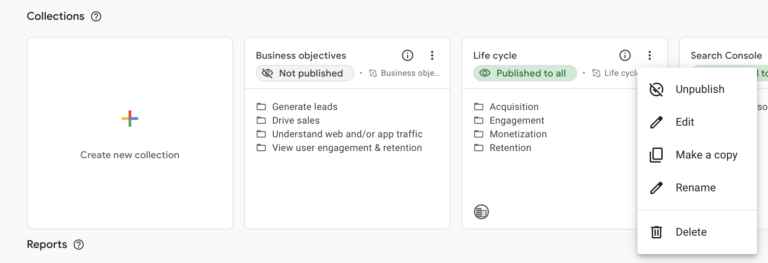
Step 2: Edit The Life Cycle Collection
Inside the Life cycle collection:
- Click the three vertical dots
- Click Edit (see image below)
Step 3: Add Your ChatGPT Report
On the right-hand side, locate the report you created earlier.
Drag it into the Acquisition section.
The position you choose here will also control where the report appears inside the Reports menu.
Step 4: Save Your Changes
Click Save
Then select:
Save changes to current collection
Now return to:
Reports → Acquisition
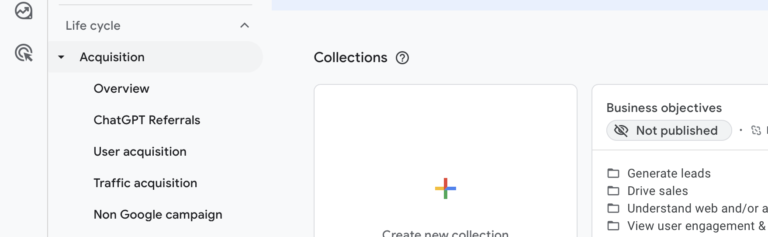
You should now permanently see your ChatGPT traffic report within the sidebar. (see below)
Why Some AI Traffic May Not Appear Clearly
AI traffic tracking is still evolving rapidly.
Some AI platforms pass referral information correctly, while others may not. Browser privacy settings, tracking limitations and AI integrations can also affect how referral traffic is recorded.
Because of this, AI traffic may sometimes appear as:
- direct traffic
- unknown referral traffic
- browser traffic
- general referral traffic
- unassigned traffic
This means Google Analytics cannot always show the complete picture.
However, as AI search continues to evolve, analytics platforms are likely to improve AI traffic reporting significantly.
Can Businesses Measure AI Traffic Conversions
Tracking AI traffic is useful, but many businesses also want to know whether those visitors become enquiries or customers.
Google Analytics 4 allows businesses to track conversions such as:
- contact form submissions
- phone button clicks
- email link clicks
- booking requests
- purchases
This means businesses can measure not only AI traffic, but also the actions visitors take after arriving on the website.
For example, if a visitor arrives from ChatGPT and submits a contact form, GA4 may record both the referral source and the conversion event.
Over time, this helps businesses understand whether AI visibility is generating real leads and enquiries.
Businesses often discover that detailed service pages, FAQs and blog articles generate strong engagement from AI related visitors.
Businesses running campaigns, email newsletters or AI-focused marketing campaigns can also use UTM tracking links to measure traffic sources more accurately inside GA4.
Google Tag Manager (GTM) allows businesses to track important actions on their website, such as contact form submissions, phone clicks and booking enquiries. When connected to Google Analytics 4, this helps businesses measure whether visitors from sources like ChatGPT and AI search platforms are turning into real leads and customers.
Why AI Traffic Matters For SEO
AI search is changing how people discover websites.
Instead of only searching Google, many users now ask ChatGPT questions such as:
- “best website designer in Surrey”
- “best GCSE maths tutor near me”
- “smart home installers in Guildford”
ChatGPT then recommends websites it considers trustworthy, relevant and well structured.
This means businesses increasingly need to optimise for:
- traditional Google SEO
- AI visibility
- structured content
- topical authority
- GEO (Generative Engine Optimisation)
Tracking ChatGPT traffic in GA4 helps businesses measure whether their website is becoming more visible within AI powered search platforms.
In many cases, websites begin receiving AI referral traffic before strong Google rankings fully develop.
Why Bing Matters For ChatGPT Traffic
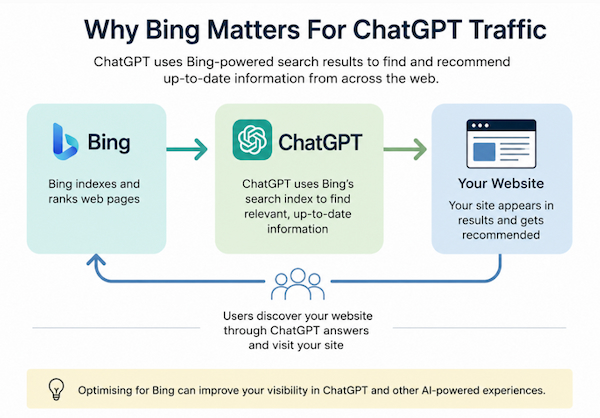
Many businesses still focus entirely on Google SEO. However, Bing has become increasingly important because Microsoft powers many AI experiences using Bing’s search index.
ChatGPT can use Bing-powered search results when retrieving live web information. This means websites performing well in Bing may also have stronger visibility within AI platforms.
Creating a Bing Webmaster Tools account can help businesses:
- submit sitemaps
- monitor indexing
- identify crawl errors
- improve Bing visibility
- understand AI search performance
Bing Webmaster Tools also provides useful SEO data that complements Google Search Console.
Google Search Console still remains essential for monitoring Google indexing and organic search performance. However, Bing optimisation is becoming increasingly important for businesses wanting stronger visibility within AI powered search experiences.
If you want to understand this in more detail, see our guide:
“Why Bing Matters For ChatGPT And AI Search”.
Final Thoughts
AI search is changing how users discover websites, services and businesses online.
Tracking ChatGPT traffic in GA4 helps businesses understand whether their content is becoming more visible within AI platforms.
Businesses combining strong SEO, GEO and structured content strategies may gain a significant long-term advantage as AI search continues evolving.
Monitoring AI traffic today could help shape smarter SEO and content decisions in the future.
More Information
If you want to increase the amount of AI traffic your website receives, it’s important to understand how AI platforms discover and recommend websites.
You can learn more in our related guides:
Questions our clients ask
You may find the answers to some common questions about Google Analytics and AI traffic in the FAQs below. If you would like more information, please feel free to get in touch.
Yes. ChatGPT traffic can often be tracked in Google Analytics 4 using referral traffic data.
In many cases, ChatGPT visits appear inside GA4 as:
chatgpt.com / referral
This allows businesses to monitor how much traffic ChatGPT sends to their website over time.
It also helps identify which landing pages perform best within AI search results.
To track ChatGPT traffic in GA4:
- open the Traffic Acquisition report
- set the primary dimension to “Session source / medium”
- search for ChatGPT referral traffic
- add landing pages as a secondary dimension
Tracking ChatGPT traffic is becoming increasingly important for businesses investing in SEO, GEO and AI visibility strategies.
Yes. Google Analytics 4 can track some AI referral traffic when AI platforms pass referral data correctly.
AI traffic tracking helps businesses understand:
- which AI platforms send visitors
- which landing pages attract AI traffic
- how AI users behave on the website
- which content performs best within AI search
Common AI related referral sources may include:
- chatgpt.com / referral
- bing / organic
- edge / referral
Some AI traffic may also appear as direct traffic if referral information is removed before the visit reaches GA4.
As AI search continues to grow, tracking AI traffic in Google Analytics is becoming an important part of modern SEO and Generative Engine Optimisation.
There are several reasons why ChatGPT traffic may not appear inside Google Analytics 4.
The most common reason is that your website has not yet received enough AI referral traffic. AI traffic is still developing rapidly, and many smaller websites receive limited ChatGPT referrals.
Another common issue is the selected date range. Expanding the report to the last 30, 60 or 90 days often helps.
Some AI platforms also remove referral information before visitors reach your website. In these situations, traffic may appear as:
- direct traffic
- unknown referrals
- unassigned traffic
Websites with strong SEO, clear structure, FAQ content and AI-friendly formatting are more likely to appear in ChatGPT responses over time.
ChatGPT traffic does not directly improve Google rankings. However, it can support wider SEO performance in several important ways.
Visitors arriving through ChatGPT may:
- spend longer on the website
- visit multiple pages
- share your content
- link to your website
- return later through Google search
These engagement signals can strengthen overall website visibility and brand awareness.
AI traffic also helps businesses reach users earlier in the research process. Many users now ask AI platforms for recommendations before using traditional search engines.
Businesses with strong SEO foundations and AI-friendly content are more likely to appear in these AI-generated responses.
Yes. Bing is becoming increasingly important within AI search and ChatGPT visibility.
Microsoft powers many AI search experiences using Bing technology and Bing’s search index.
Because of this, Bing visibility can influence how websites appear within AI-generated search results.
Bing Webmaster Tools can help businesses:
- monitor indexing
- submit sitemaps
- identify crawl issues
- improve Bing search visibility
- support wider AI visibility strategies
While ChatGPT referral traffic is usually tracked inside GA4, Bing data can provide additional insights into how websites perform across AI powered search environments.
Businesses investing in both Google SEO and Bing optimisation are often better positioned for long-term AI visibility growth.