
Google Search Console’s New AI Report: What Can You Track in 2026?
Google has introduced a new report in Google Search Console that helps website owners see when their pages appear in AI-powered search results. But what does this mean for your business? We explain what the new report shows, how to use it and why it matters for your website’s visibility on Google.
What Is Google Search Console?
Google Search Console is a free tool that helps you understand how your website performs in Google Search. It shows how often your pages appear in search results (impressions), how many organic (not Pay Per Click campaigns) clicks they receive and which searches bring people to your website.
It also highlights technical issues that could affect your visibility. This helps you identify problems and find opportunities to improve your website’s performance on Google.
Google's New AI Performance Report – Launched in June 2026
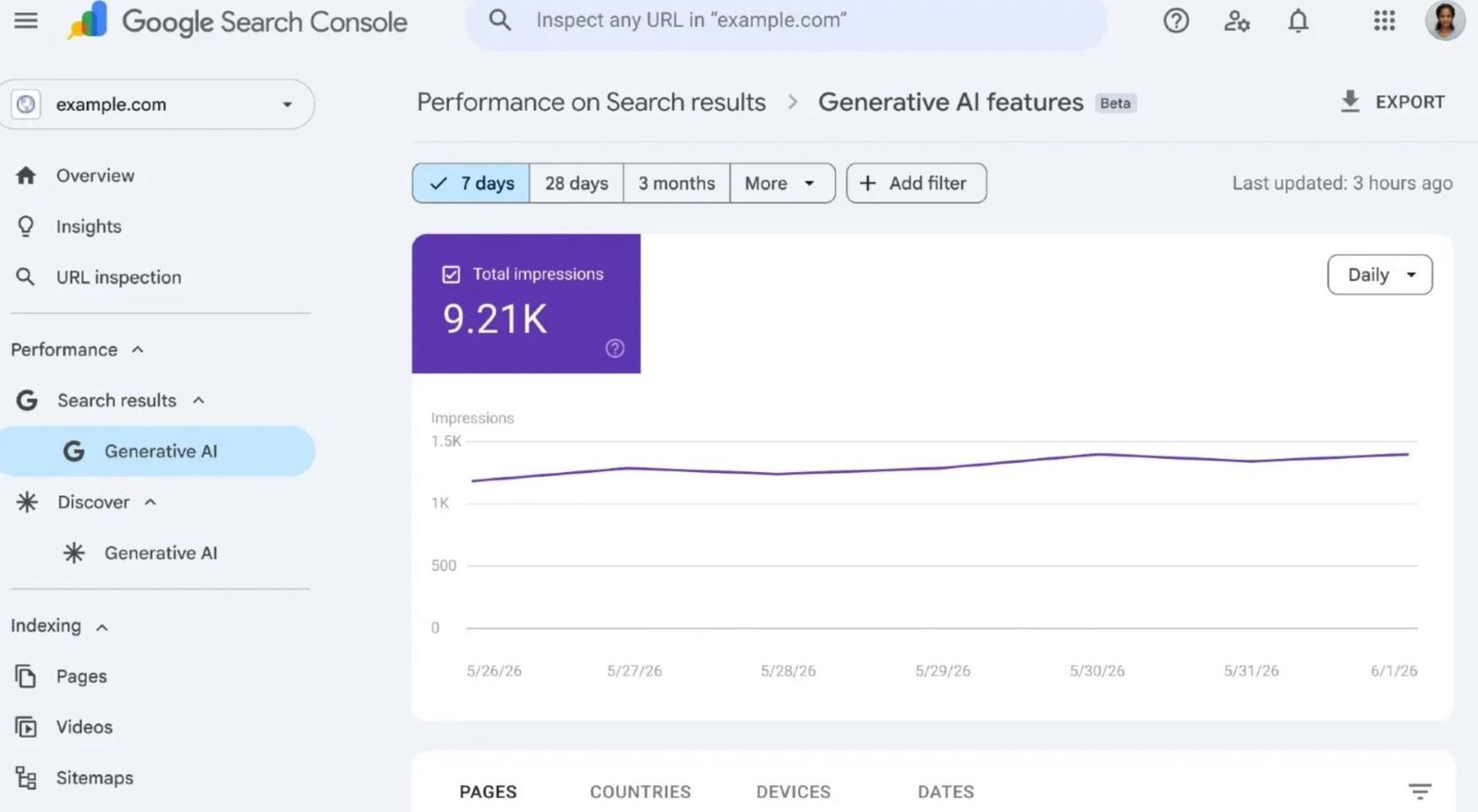
Google’s new Generative AI Performance report (see image below) tracks your website’s appearances in AI Overviews and AI Mode. Each recorded appearance is called an impression. This shows that your website has gained visibility in Google’s AI-powered search results.
The report provides several ways to explore your website’s AI visibility:
AI impressions over time: Compare daily, weekly or monthly figures to see how often your website appears in Google’s AI results.
Website pages: Discover which pages Google displays most frequently in its AI-powered search features.
Countries: See which countries people are searching from when Google displays links to your website.
Devices: Check whether your pages appear on desktop computers, tablets or mobile phones.
These insights help you understand which pages are gaining more exposure through Google’s AI features.
For example, you might discover that a particular service page receives more AI impressions than your homepage. You can then review that page, improve its content and monitor its performance over time.
However, an AI impression doesn’t necessarily mean someone has visited your website. The new report measures visibility, which is different from actual website traffic.
It’s important to note that Google’s Generative AI Performance report does not track mentions or website links in ChatGPT. However, Google Analytics 4 can show when visitors reach your website through links in ChatGPT, using its AI Assistant traffic report. Read this article if you want to know more ‘How Do You Track ChatGPT & AI Traffic In Google Analytics‘.
Can You Track Clicks from Google's AI Results?
At the moment, Google Search Console’s new Generative AI report only tracks impressions, not individual clicks.
This means you can see how often your website appears in Google’s AI Overviews and AI Mode. However, you cannot see exactly how many people click through to your website from these AI features.
Google still records these clicks in its main Search Console Performance report. However, it combines them with clicks from traditional Google search results rather than displaying them separately.
So, what does this mean for your business?
Your website could receive hundreds of AI impressions without necessarily gaining any additional visitors. Although this visibility is encouraging, it doesn’t automatically lead to more website traffic or enquiries.
For now, the best approach is to monitor your AI impressions alongside your overall Google Search clicks and Google Analytics data. Together, these figures can help you understand wider trends in your website’s visibility and traffic.
How to Find Your AI Performance Report in Google Search Console
Finding your website’s AI performance report in Google Search Console is straightforward. You don’t need any additional software or paid SEO tools.
Follow these simple steps:
Sign in to Google Search Console using the Google account connected to your website.
Select your website from the property menu in the top-left corner.
Find the Generative AI report under Performance in the left-hand menu. Select the report for Google Search.
Choose your date range at the top of the report. You can view recent activity or examine trends over several months.
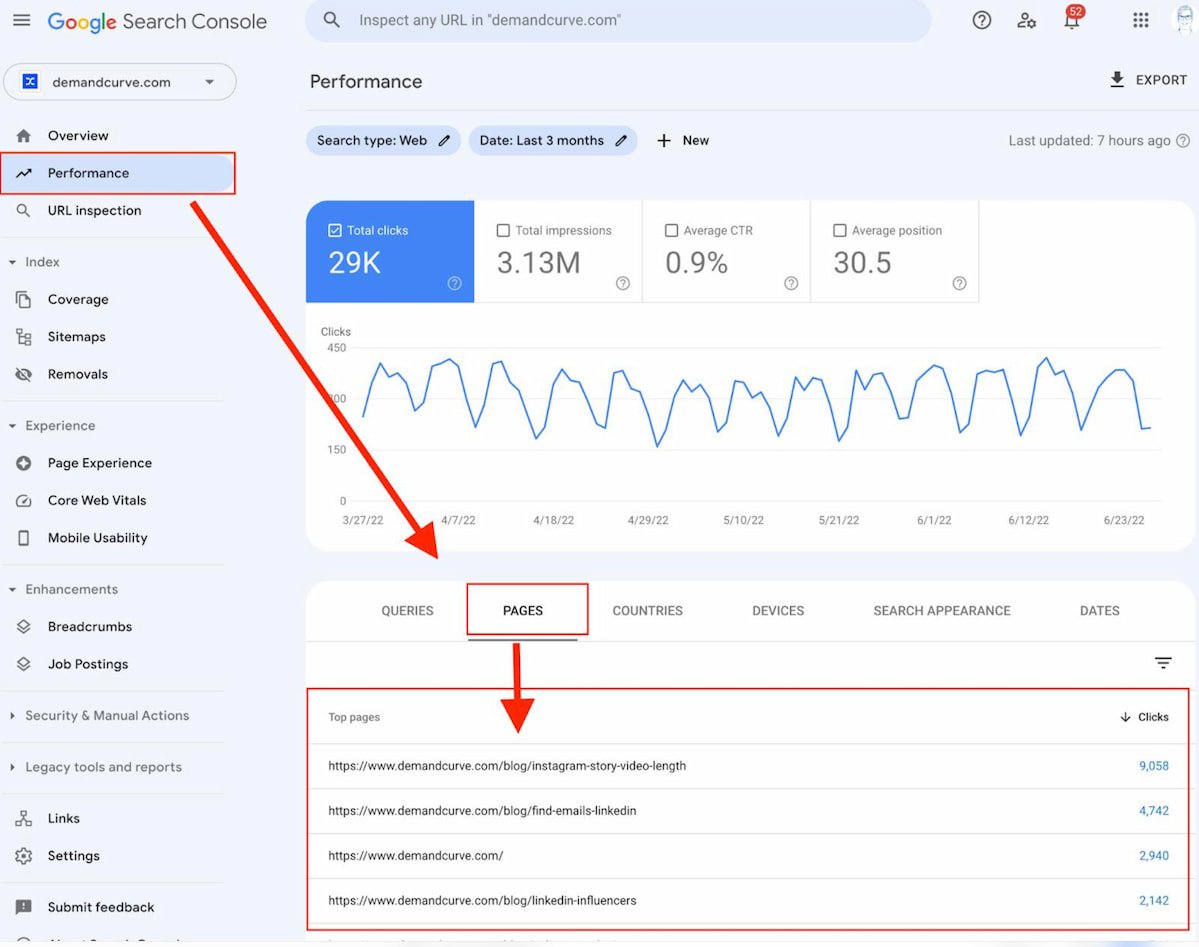
Explore your results by selecting Pages, Countries, Devices or Dates below the impressions graph. (see image below)
For a clearer picture, try reviewing your AI impressions over the last three months. You can then compare them with an earlier period to see whether your visibility has increased.
What if you can’t see the Generative AI report?
Don’t worry. Although Google completed its worldwide rollout in August 2026, some websites may not display the report. According to Google, this usually happens when a website hasn’t received enough AI impressions.
This doesn’t necessarily mean there’s a problem with your website or its SEO.
Why Does AI Visibility Matter for Small Businesses?
Google is changing how people find information online. Instead of seeing only traditional search results, potential customers may now see AI-generated answers to their questions.
These AI Overviews often include links to websites that provide useful, relevant information. As a result, small businesses have another opportunity to appear in front of potential customers.
For example, someone searching for a local service in Surrey might see an AI Overview linking to a nearby business’s services page.
Even if that person doesn’t click through immediately, the website has gained exposure within Google’s AI-powered search results.
Why is this important for your business?
By tracking AI impressions, you can discover which pages Google displays within its AI features. You can then use this information to identify opportunities to improve your website’s content and online visibility.
However, AI visibility is only one part of successful SEO. You should continue monitoring website traffic, customer enquiries and conversions to understand how your website supports your business.
How Can You Use This Information to Improve Your SEO?
Google’s new AI Performance report provides useful information to help you improve your website’s SEO. By reviewing your results regularly, you can identify opportunities to strengthen your content and increase your online visibility.
Here are five practical ways to use the information:
Identify pages receiving AI impressions. Check which pages Google displays in AI Overviews and AI Mode. This helps you understand which areas of your website are gaining visibility.
Review your service pages. Look at which services receive the most AI impressions. For example, a local business might discover that one service page appears more frequently than others.
Monitor changes over time. Compare your AI impressions over several months. This helps you identify trends rather than focusing on short-term changes.
Improve your website content. Continue creating helpful, accurate and up-to-date information. Use clear headings, answer common customer questions and explain your services in plain English.
Compare your traditional SEO performance. Review your AI impressions alongside your usual Google Search clicks, impressions and website traffic. This gives you a broader picture of your online visibility.
Remember, good SEO is still important. A well-structured website with relevant, helpful content supports both traditional Google Search and AI-powered search features.
Although the new report doesn’t provide all the answers, it gives businesses another useful way to monitor their visibility as Google Search evolves.
What Can't Google Search Console Tell You About AI?
Although Google’s new Generative AI report provides useful insights, it still has several limitations.
At present, the report cannot tell you:
Exact search queries: You cannot see the specific questions or AI prompts that caused your website to appear in Google’s AI results.
Individual AI clicks: The report tracks impressions but doesn’t show how many visitors clicked through from AI Overviews or AI Mode.
Customer enquiries and conversions: You cannot tell whether an AI impression resulted in a phone call, contact form submission or sale.
Visibility on other AI platforms: Google Search Console doesn’t track appearances in ChatGPT, Claude, Perplexity or other independent AI search platforms.
The report also doesn’t show exactly what Google’s AI said about your business or how it presented your website.
So, while AI impressions are a useful measure of visibility, they don’t tell the whole story.
For a better understanding of your website’s performance, use Google Search Console alongside Google Analytics and your usual enquiry tracking.
Together, these tools provide a broader picture of how people discover and interact with your business online.
“Impressions are how many times links to your site were shown to a user in a generative AI feature on Google Search.”
— Google Search Console Help
H2: What Should Business Owners Do Next?
Google’s new AI Performance report gives business owners another useful way to understand their website’s visibility online.
Start by checking which pages receive AI impressions. Then, compare these results with your existing Google Search Console and Google Analytics data.
Most importantly, continue improving your website with clear, helpful content that answers your customers’ questions. Good SEO remains essential, even as AI changes how people search online.
Need help improving your website’s visibility?
At Surrey Web Studio, we help local businesses improve their online presence through SEO (Search Engine Optimisation) and GEO (Generative Engine Optimisation).
Whether you want to improve your Google rankings, understand your website’s performance or strengthen your visibility in AI-powered search, we’re here to help.
Get in touch to discuss how we can help your business grow online.
Further Reading
For all resources related to AI and ChatGPT, read more in our related guides:
- Why Bing Matters For ChatGPT And AI Search
- What are Google AI Overviews & how to businesses get chosen?
- How To Get Your Business Found In ChatGPT And AI Platforms
- How Do You Track ChatGPT & AI Traffic In Google Analytics
- Visit Google to find out more about ‘AI Performance Reports’ here
Questions Our Clients Ask
You may find the answers to some common questions about 'Google Search Consoles AI Performance Report' in the FAQs below. If you would like more information, please feel free to get in touch.
Yes. Google allows you to export the information from your Generative AI Performance report. Simply click the Export button to download your impressions data, including the chart and table.
This is useful for keeping monthly records, comparing performance and sharing reports with your website designer or SEO specialist.
Google provides separate Generative AI reports for Search and Discover. The Search report covers impressions from AI Overviews and AI Mode.
Meanwhile, the Discover report tracks appearances within generative AI features in Google Discover. This allows you to examine the two sources of visibility separately.
Google sometimes displays preliminary data while it continues collecting and processing information. As a result, your most recent impression figures may change after you first view them.
For more reliable comparisons, review completed reporting periods rather than focusing on the latest figures.
AI search is changing how customers discover businesses online. Google’s new Generative AI report offers valuable insights, but impressions are only part of the picture. At Surrey Web Studio, we help local businesses understand their search performance and improve their visibility through effective SEO and GEO strategies. By combining helpful content, strong SEO foundations and the latest developments in AI search, we help businesses prepare for the future of online search.